Time Pass Logo
  • Tech
    Performance
  • Generators
    Baby NameStartup NameResume HeadlineWifi PasswordWebsite Name
Subscribe
Log In

Timepass

Timepass is a space to relax, explore the latest tech, trends, and products, and read insightful blogs. Questions? Email timepassfyi@gmail.com.

TwitterFacebookLinkedInInstagramYouTube

Explore

  • Performance
  • Tech
  • Generators

Company

  • About Us
  • Contact
  • Advertise

Legal

  • Privacy Policy
  • Terms of Service
  • Cookie Policy
  • Disclaimer

© Timepass 2025. All rights reserved.

↑ Back to top
Reduce Server Response Time for SEO Pages | CMS & Caching | Time Pass
Performance

Varnish : Best way to cache your content for seo pages

Piyush - Article Author
Piyush
February 8, 20262 min read

For websites that have the large number of SEO pages and significantly high concurrent users, developers mainly face the problem of loading website fast. They try to optimize the java script but usually don't pay much attention to the server response time. Slow server response time can significantly impact your page rankings,  page load time and user experience.  In this article,  I will cover the problems we face with server response time and how we can ensure it remains low. 

 

how-does-Initial-Server-Response-Time-work.png

Stay Updated

Get the latest news delivered to your inbox

SEO
Content
cache
Varnish
reverse proxy

Read More

React Js Working

React vs. Next.js 12 vs. Next.js 13 and Next.js 14: Key Differences & Best Uses

A comprehensive guide comparing React, Next.js 12, and Next.js 13 & Next.js 14. Discover each framework’s unique features, core differences, performance aspects, and which one suits different project types best. Perfect for developers deciding on the right tech stack for 2024

By Piyush - Feb 1, 2026
📖2 min read
how-does-Initial-Server-Response-Time-work.png

Varnish : Best way to cache your content for seo pages

By Piyush - Feb 8, 2026
📖2 min read
Coding

 
How to reduce the server response time for SEO pages

Content Management System(CMS)

Most of the website rely on content management system to load the content for their website. Its easy to add update and manage your content there. For one such purpose we are using Strapi for our SEO pages. The main problem with the cms is as your content grows the query time of your pages grows as well . This happens because - 

  1. There are multiple content types and components that are attached to single entry in CMS.
  2. Whenever we request a page from the CMS it has to combine all the content from different content types and components and present it in a single API response.
  3. As the number of components increase the query using which strapi fetch the content from the DB becomes more complex which time to time increase the response time of our application.

Introducing a Caching Layer: Varnish


varnish-cache-how-it-works.jpg

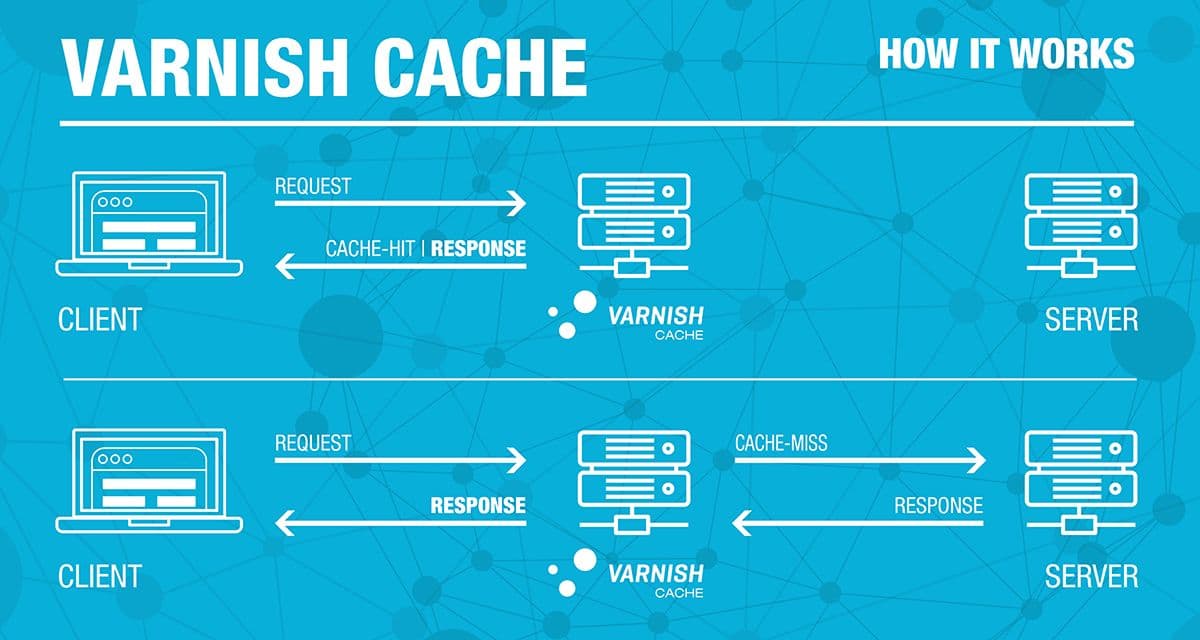
To tackle this problem we introduced the caching layer between the client and server. 
Varnish is the caching layer that sits between your CMS and web application. It is specifically build to cache server responses and reduce the load on server or CMS.  How varnish works - 
 

  1. The first  request passes through it and while the request is going back it caches the content so first time it gives the MISS signal to the user and caches the response.
  2. The next time when the same request comes it gives the cached response to the user.
  3. We can write a config for varnish where we can decide for how much time we have to cache the content, how to invalidate the cache.  
    This drastically reduces the server response time, as now the request does not hit the CMS to get the content it is now served from varnish. 

Impact 

  1. Fast page load times
  2. Reduces the load on CMS for each request
  3. Better page performance
  4. During traffic hikes the system remains stable 


How to improve performance using inlineCSS Flag in next js

A concise guide to how we can achieve a performance boost in our web page by inlining the CSS.

By Piyush - May 23, 2025
📖3 min read
Coding

How to Inline Critical CSS in Next.js 12 & Next.js 15

A concise guide to using the new inline CSS feature in Next.js 15, comparing it with Next.js 12, and exploring its benefits and limitations for performance

By Piyush - May 23, 2025
📖2 min read